 Sheetstead
Free
Free Invoice Log for Google Sheets™
A simple invoice log with a totals row. Formulas only — no script, so there's no permission screen.
Copy the free sheet (opens in a new tab)
No email needed. The copy goes into your own Google account.
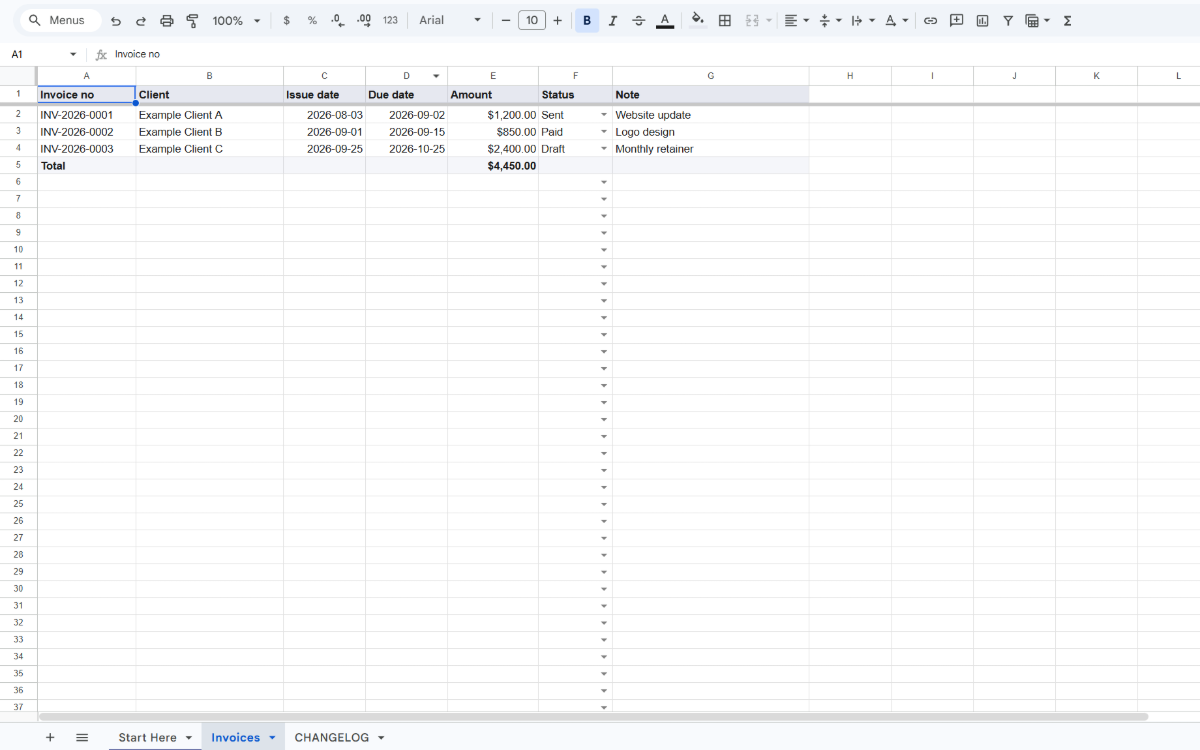
What's inside
- Start Here: how to use the log and how to delete the 3 example rows
- Invoices: one row per invoice, with a totals row
- CHANGELOG: what changed in each version
The columns on the Invoices tab
| Column | What to type |
|---|---|
| Invoice no | Your own invoice number, such as INV-2026-0001. |
| Client | Who the invoice is for. |
| Issue date | The day you sent the invoice. |
| Due date | The day payment is due. |
| Amount | The invoice total. |
| Status | Draft, Sent, Paid or Void, picked from a list. |
| Note | Anything you want to remember, such as the project. |
Dates show as year-month-day, and amounts show with a $ sign and two decimal places.
How the totals row works
The totals row adds up the Amount column for every row above and below it, whatever the status. You can type new invoices under it, insert rows or delete the example rows, and the total stays right.
Start in three steps
- Copy the sheet into your Google account with the button at the top of this page.
- Delete the 3 example rows: select rows 2 to 4, right-click and choose Delete rows.
- Type one invoice per row on the Invoices tab.
Need more than a log?
The Sheetstead Template Bundle adds both trackers: invoices with partial payments and days overdue, and orders with fees, profit and stock. $14.99 USD, one-time. Bought separately: $19.98 USD.
The Freelancer Invoice & Payment Tracker adds partial payments, days overdue, a printable invoice and a dashboard. $9.99 USD, one-time.