 Sheetstead
How to Calculate Profit per Order in Google Sheets
Updated
To calculate profit per order in Google Sheets, work out gross sales for each order, subtract the channel fee and payment fee (each a percentage plus a fixed amount), then subtract shipping cost and product cost. Divide net profit by gross sales to get the margin. Keep your fee rates in separate cells so you can update them.
What you need
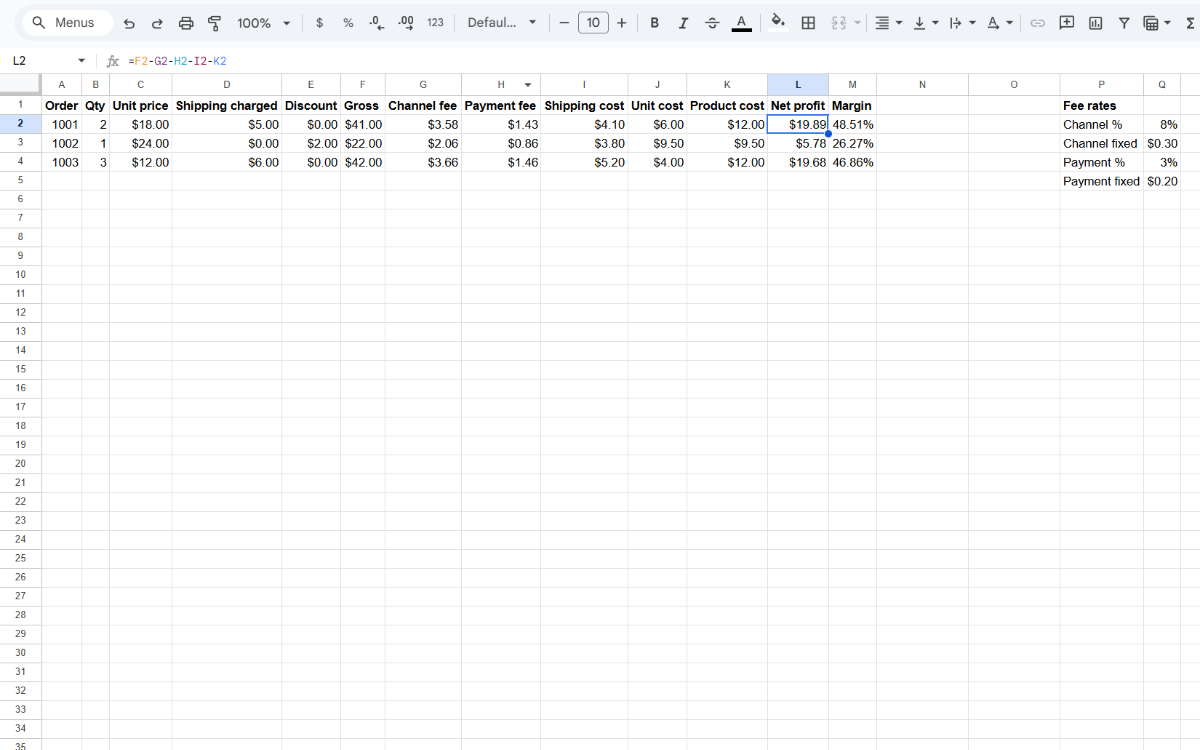
Columns: A Order, B Qty, C Unit price, D Shipping charged, E Discount, I Shipping cost, J Unit cost. Fee rates in Q2 (channel %), Q3 (channel fixed), Q4 (payment %), Q5 (payment fixed).
Put the headers in row 1 and one order on each row below them. Qty, Unit price, Shipping charged and Discount come from the order itself. Shipping cost is what you paid to send it, and Unit cost is what one unit cost you to make or buy. Type the four fee rates as numbers: a percentage such as 8% in Q2 and Q4, and a fixed amount in dollars such as 0.30 in Q3 and Q5. Leave columns F, G, H, K, L and M for the formulas below, which expect the rates in exactly these four cells.
Step 1: Gross sales
Gross sales is everything the buyer paid for the order. Shipping the buyer paid for counts as sales, and a discount lowers it. Enter this in F2 and copy it down:
=B2*C2+D2-E2Step 2: Fees
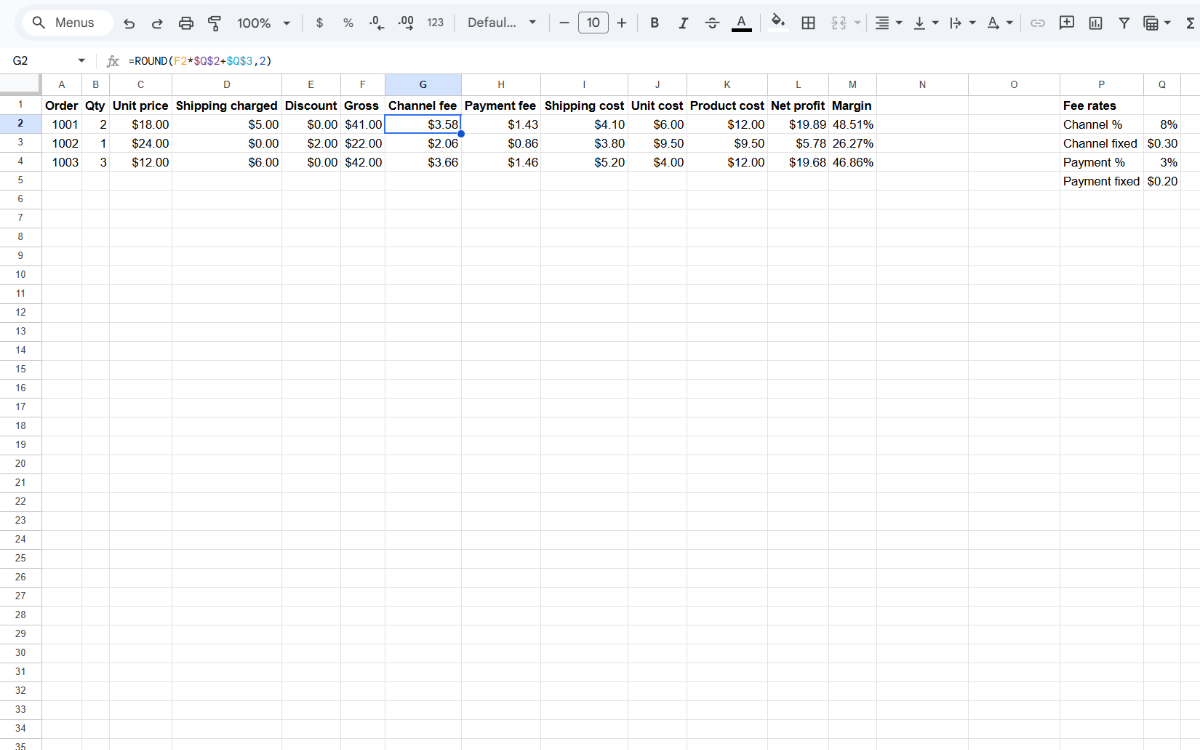
Each fee is a percentage of gross sales plus a fixed amount per order. Enter the channel fee formula in G2 and the payment fee formula in H2, then copy both down:
=ROUND(F2*$Q$2+$Q$3,2)=ROUND(F2*$Q$4+$Q$5,2)The dollar signs in $Q$2 to $Q$5 keep every row pointed at the same rate cells when you copy the formulas down. ROUND(…,2) rounds each fee to the cent, so the fee columns show amounts you can compare line by line with your payout statement.
Step 3: Product cost and net profit
Product cost is the number of units times what one unit cost you. Net profit takes both fees, what you paid for shipping and the product cost away from gross sales. Enter the first formula in K2 and the second in L2, then copy them down:
=B2*J2=F2-G2-H2-I2-K2A negative number in column L means the order lost money. That can happen on small orders, where the fixed part of each fee is a large share of the sale, or when shipping cost you more than the buyer paid for it. Adding up column L gives your total profit across all the orders on the sheet.
Step 4: Margin
Margin shows net profit as a share of gross sales. Enter this in M2, copy it down, and show column M as a percentage with Format › Number › Percent:
=IF(F2=0,"",L2/F2)The IF leaves the cell blank when a row has no sales, so empty rows don't show a division error. A margin of 25% means a quarter of what the buyer paid is profit you keep.
Worked example
The row below follows one order of 2 units at $18.00 each, with $5.00 of shipping charged, $4.10 of shipping paid and a unit cost of $6.00. The rates are placeholders; yours may differ.
| Qty | Unit price | Shipping charged | Discount | Gross | Channel fee | Payment fee | Shipping cost | Product cost | Net profit | Margin |
|---|---|---|---|---|---|---|---|---|---|---|
| 2 | $18.00 | $5.00 | $0.00 | $41.00 | $3.58 | $1.43 | $4.10 | $12.00 | $19.89 | 48.51% |
Net profit $19.89 · Margin 48.51%
To check the row by hand: 41.00 × 8% + 0.30 = 3.58, and 41.00 × 3% + 0.20 = 1.43. Taking 3.58, 1.43, 4.10 and 12.00 away from 41.00 leaves 19.89, which is 48.51% of 41.00. When a rate changes, update its cell in column Q and every order recalculates.
Common mistakes
- Fees charged on the item price only. Check whether your platform also charges on shipping.
- Refunded orders left in the totals. Exclude them from your sums.
- Rates typed into every formula. Keep them in one place so a rate change takes one edit.